
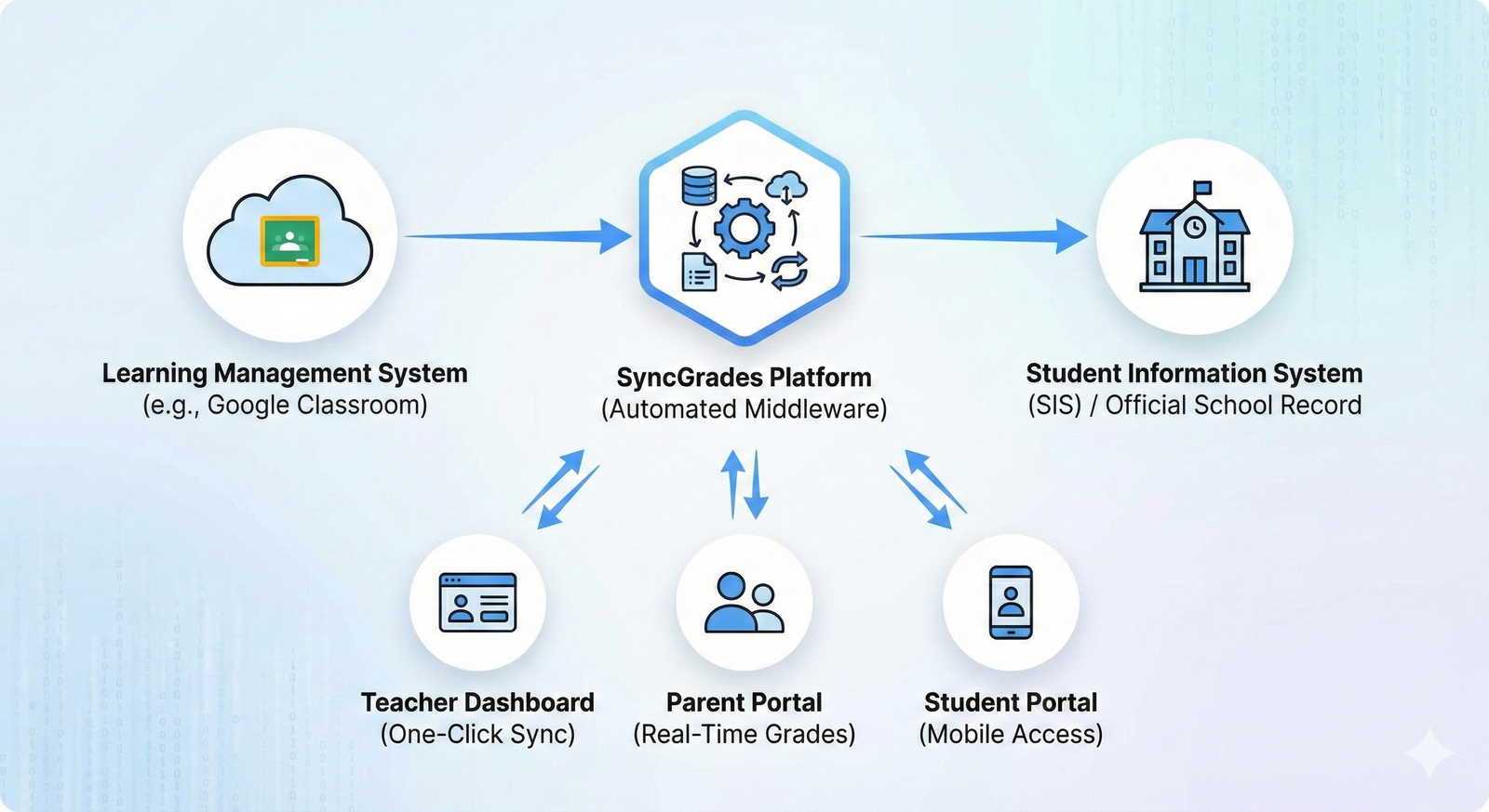
In the high-stakes world of modern education, data fragmentation is a silent killer of productivity. Teachers spend countless hours manually transferring grades from Learning Management Systems (LMS) like Google Classroom to official Student Information Systems (SIS). This “double entry” drudgery not only wastes valuable instructional time but also introduces human error. Enter SyncGrades a powerful ed-tech solution designed to bridge this digital divide.
SyncGrades has emerged as a critical tool for K-12 institutions, particularly gaining traction in districts like New York City, where the need for seamless data flow is paramount. By automating the synchronization of academic data, it transforms grading from a clerical burden into a real-time feedback loop. For parents and students, it offers a transparent window into academic performance, attendance, and assignment details, eliminating the anxiety of waiting for report cards. This article provides a comprehensive deep dive into the SyncGrades ecosystem, exploring how it optimizes school workflows, empowers families, and secures sensitive educational data.
Understanding SyncGrades: The Digital Bridge
At its core, SyncGrades is an interoperability platform that acts as a connector between the tools teachers use daily and the official records schools are required to keep. While an LMS is great for assigning work and collecting digital submissions, it is rarely the official legal record of a student’s transcript. SyncGrades sits in the middle, pulling data from the instructional side and pushing it to the administrative side.
This middleware approach solves the “silo” problem. Without it, a grade on an essay might sit in a cloud platform for weeks before making it to the official register. SyncGrades ensures that as soon as a teacher grades an assignment, that data is normalized and prepared for the official record, keeping all stakeholders aligned without manual intervention.
The “Double Entry” Problem Solved
The primary value proposition of SyncGrades is the elimination of double data entry. A typical high school teacher with 150 students and 20 assignments per term performs roughly 3,000 manual data entry keystrokes per marking period. This is not only tedious but prone to transposition errors typing a 90 instead of a 09, for example.
SyncGrades automates this pipeline. It maps the grading scale from platforms like Google Classroom directly to the specific columns in the SIS (such as STARS in NYC or PowerSchool elsewhere). This allows teachers to focus on pedagogy and feedback rather than functioning as data entry clerks, significantly reducing burnout rates associated with administrative overhead.
Key Features for Teachers
For educators, SyncGrades is more than just a syncing utility; it is a dashboard for classroom management. It allows for the granular viewing of student metrics that might be buried in other platforms. Teachers can view assignment completion rates, identify students falling behind, and manage attendance all from a single interface.
- One-Click Sync: Often features a simple button to “push” grades.
- Assignment Mapping: Automatically links new assignments to the correct grading category (e.g., Homework vs. Tests).
- Visual Analytics: Color-coded gradebooks to spot trends instantly.
Student & Parent Portals
Transparency is the enemy of academic anxiety. SyncGrades provides dedicated portals for students and parents, moving beyond the “black box” of traditional grading. Instead of asking “how am I doing?” a week before finals, students have continuous access to their standing.
The parent view is equally robust, offering insights into:
- Real-time Gradebook: Viewing grades the moment they are entered.
- Missing Assignment Alerts: Proactive notifications before grades plummet.
- Attendance Tracking: Seeing cuts or lateness alongside academic performance.
How it Works: The Sync Process
The technical magic of SyncGrades lies in API (Application Programming Interface) integrations. It authenticates with the LMS (like Google Classroom) using secure tokens, reading the assignment titles, point values, and student scores. It then translates this data into a format compatible with the SIS.
This process involves “roster matching,” ensuring that “John Smith” in Google Classroom is identified as the same “John Smith” in the official register, even if his email addresses differ slightly. This intelligent matching engine prevents data mismatches and ensures integrity across platforms.
Mobile App Functionality
In 2026, accessibility means mobile-first. The SyncGrades mobile app (available on iOS and Android) puts academic data in the pocket of every stakeholder. For students, this often means push notifications for new grades or upcoming due dates.
The app is designed to be lightweight and user-friendly, stripping away the complex menus of desktop SIS platforms. It focuses on the metrics that matter most: “What is my current average?” and “What do I owe?” This immediacy encourages student agency and self-regulation.
Benefits for School Administrators
For principals and district leaders, SyncGrades offers macro-level visibility. Administrators can run reports to see which departments are lagging in grade updates or identify cohorts of students at risk of failure across multiple subjects.
- Compliance Monitoring: Ensuring teachers are updating gradebooks weekly.
- Data Accuracy: Reducing grade change requests caused by clerical errors.
- Resource Allocation: Identifying struggling classes for intervention support.
Privacy & Security (FERPA Compliance)
Handling student data requires strict adherence to federal laws like FERPA (Family Educational Rights and Privacy Act). SyncGrades is built with enterprise-grade security protocols to ensure that sensitive data remains confidential.
- Encryption: Data is encrypted in transit and at rest.
- Role-Based Access: Parents only see their own child’s data; teachers only see their own roster.
- Audit Logs: Tracking who changed a grade and when, providing a digital paper trail for accountability.
Comparison: SyncGrades vs. TeachHub/Skedula
In the competitive landscape of EdTech, SyncGrades faces rivals like the DOE’s TeachHub or Skedula (PupilPath). While proprietary district tools like TeachHub offer deep integration, they often lack the user-friendly interface or the specific “Google Sync” capabilities that third-party tools like SyncGrades perfected.
| Feature | SyncGrades | Official District Portals (e.g., TeachHub) |
| UI/UX | Modern, Mobile-First | Often Legacy/Clunky |
| LMS Integration | High (Google Classroom focus) | Variable/Limited |
| Setup Speed | Fast | Bureaucratic |
| Customization | High | Low |
Setup Guide for First-Time Users
Getting started with SyncGrades usually begins with account activation via a school-provided code or email link.
- Invitation: Users receive a secure link to claim their account.
- Role Selection: Identifying as Teacher, Student, or Parent.
- LMS Authorization: Teachers must authorize the connection to their Google Classroom.
- Notification Preferences: Setting up email or push alerts for grade updates.
Troubleshooting Common Sync Issues
No technology is flawless. Common issues with SyncGrades often stem from mismatched data in the source systems. If a student is dropped from a roster in the SIS but remains in Google Classroom, sync errors can occur.
- “Unmatched Student” Error: Requires manual linking of the student profile.
- Grade Scale Mismatch: If Google uses 0-100 but SIS uses A-F, a translation table must be configured.
- API Limits: Occasional delays during peak reporting times (midterms/finals).
Improving Parent-Teacher Communication
SyncGrades acts as a neutral ground for communication. By providing data upfront, parent-teacher conferences can move past “what is my child’s grade?” to “how can we support my child’s learning?” The platform often includes messaging features that allow parents to query specific assignments without cluttering email inboxes.
The Role in NYC Schools
SyncGrades has a specific history within the New York City Department of Education ecosystem. Many schools adopted it as a more agile alternative to the centralized systems, praising its ability to handle the specific grading policies of NYC schools. While district mandates fluctuate, the popularity of SyncGrades in this massive market highlights its scalability and robustness.
Cost & Implementation
Unlike free consumer apps, SyncGrades is typically a SaaS (Software as a Service) platform purchased by schools or districts. The pricing model usually scales based on student enrollment. For schools, the ROI is calculated in reclaimed teacher hours and improved parent engagement scores.
Why Real-Time Data Matters for Student Success
The lag time between an action (taking a test) and feedback (seeing the grade) is critical for learning. SyncGrades minimizes this latency. When students see the immediate impact of a zero on their average, they are more motivated to complete the work. This “gamification” of checking grades, while controversial to some, effectively drives engagement in the digital age.
Future of Academic Syncing Tools
As AI enters the classroom, tools like SyncGrades will evolve. We can expect predictive analytics warning a student they are predicted to fail based on current trends and even tighter integrations with AI tutoring systems. The future is not just syncing numbers, but syncing learning insights to create a holistic view of the student.
Frequently Asked Questions
What is SyncGrades used for?
SyncGrades is a digital platform used by schools to synchronize grades, attendance, and assignment data between Learning Management Systems (like Google Classroom) and official school records, while providing portals for parents and students to view this data in real-time.
How do I log into SyncGrades as a parent?
You typically need an invitation code or a setup link provided by your child’s school. Once registered, you can log in via the SyncGrades website or mobile app using your email and created password.
Does SyncGrades work with Google Classroom?
Yes, one of SyncGrades’ primary features is its deep integration with Google Classroom, allowing teachers to import grades directly from Google assignments into their official gradebook without manual typing.
Is the SyncGrades app free?
The app is free to download for students and parents, but the service must be subscribed to and implemented by the school or district for the app to function with your data.
Why are my grades not showing up in SyncGrades?
Delays can happen if the teacher has not yet clicked the “sync” button, if there is a discrepancy between the student’s name in the LMS and the roster, or if there is a temporary API outage. Contact your teacher to confirm they have posted the grades.
Can students see their GPA in SyncGrades?
Yes, depending on the school’s configuration settings, SyncGrades can display current cumulative averages and GPA, helping students track their progress toward graduation or honor roll requirements.
Is SyncGrades secure?
SyncGrades complies with FERPA and NYSED data privacy laws. It uses encryption to protect student information and ensures that data is not sold to third parties.
Conclusion
In an educational landscape that demands both efficiency and transparency, SyncGrades stands out as a vital piece of infrastructure. It addresses the unglamorous but essential task of data management, freeing educators to do what they do best: teach. By dismantling the data silos that separate classrooms from homes, it fosters a collaborative environment where students, parents, and teachers are all on the same page literally and figuratively. As schools continue to digitize, the seamless integration provided by platforms like SyncGrades will cease to be a luxury and become a standard expectation for modern learning communities.




