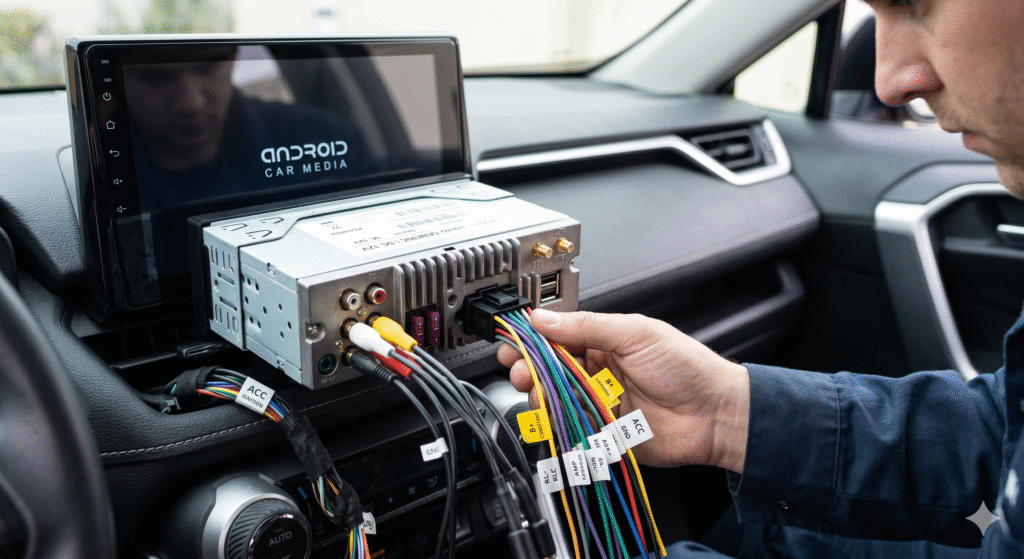
Upgrading your vehicle with a 10.1-inch Chinese Android head unit is one of the most rewarding DIY projects for any car enthusiast. These large-screen devices offer modern features like wireless CarPlay, Android Auto, and high-definition GPS navigation at a fraction of the cost of brand-name units. However, the most daunting part for many is the installation. A 10.1 inch chinese android car stereo wiring diagram is essential because these “universal” units often come with sparse instructions or non-standard labeling that can confuse even seasoned hobbyists.
Understanding how to bridge your car’s factory harness with the new Android system is the key to a successful setup. Miswiring can lead to blown fuses, drained batteries, or even permanent damage to your new electronics. In this comprehensive guide, we provide a clear, easy-to-follow breakdown of the 16-pin power harness, RCA outputs, and specialized connections like backup cameras and steering wheel controls. Whether you are installing a unit from Hizpo, Eonon, or a generic brand from AliExpress, this walkthrough ensures your installation is professional, safe, and fully functional.
Understanding the Universal 16-Pin Power Harness
The heart of almost every 10.1-inch Chinese Android head unit is the standard 16-pin power connector. While the car’s interior might vary, these head units almost always use a specific pinout that handles power, ground, and speaker signals.
- Main Power Leads: The Yellow (Constant 12V), Red (ACC/Ignition), and Black (Ground) wires are the most critical for basic operation.
- Speaker Outputs: These are typically arranged in four pairs of solid and striped colors (White, Gray, Green, and Purple).
- Control Wires: Includes triggers for the reverse camera, illumination, and power antenna.
Standard Color Code Breakdown for Power and Ground
Identifying the power wires correctly is vital to ensure your stereo turns on and off with the car while retaining its memory settings.
- Yellow (B+ / Battery): Connects to a constant 12V source to save your radio stations and clock.
- Red (ACC / Ignition): Connects to the switched 12V source that turns the unit on when you turn the key.
- Black (GND / Ground): Must be attached to a clean, unpainted metal part of the car’s chassis.
- Orange (ILL / Illumination): Dims the screen when you turn on your headlights at night.
Mastering the Speaker Wire Pairs
Each of the four speakers in your car uses two wires: a positive (solid color) and a negative (color with a black stripe). Getting the “phase” right is essential for high-quality bass and sound clarity.
- Front Left: White (+) and White/Black (-)
- Front Right: Gray (+) and Gray/Black (-)
- Rear Left: Green (+) and Green/Black (-)
- Rear Right: Purple (+) and Purple/Black (-)
| Wire Color | Position | Polarity |
| White | Front Left | Positive (+) |
| White/Black | Front Left | Negative (-) |
| Gray | Front Right | Positive (+) |
| Gray/Black | Front Right | Negative (-) |
Reverse Camera Wiring and Trigger Logic
The 10.1-inch display is perfect for a backup camera. To make the screen switch automatically when you shift into reverse, you must connect the “BACK” or “REVERSE” trigger wire.
- The Pink/Brown Wire: Usually labeled “BACK,” this wire needs to receive a 12V signal from your car’s reverse light bulb.
- RCA Input: The camera video feed must go into the specific “CAM-IN” RCA port, not a general Video-In port.
- Camera Power: You can tap into the reverse light power at the rear of the car to power the camera itself.
Connecting Steering Wheel Controls (SWC)
Most 10.1-inch Chinese Android units use an analog resistive system for steering wheel controls, often labeled as KEY1 and KEY2.
- Direct Wiring: If your car uses an analog signal, you connect the SWC wires directly to KEY1/KEY2 and ground.
- Digital/CANBUS: If your car uses a digital system (common in European cars), you will need a CANBUS decoder box.
- Programming: Once wired, you must go into the Android “Factory Settings” or “Steering Learn” app to map the buttons.
Utilizing the 20-Pin RCA Input/Output Cable
Beyond the main 16-pin harness, your unit likely came with a larger 20-pin plug filled with RCA connectors for expanded audio and video.
- Audio Out: Includes RCA plugs for Front Left, Front Right, and a dedicated Subwoofer output.
- Video Out: Used to send the screen signal to external headrest monitors for passengers.
- External Mic: A 3.5mm jack or RCA dedicated to an external microphone for better call quality.
The Role of the CANBUS Decoder
If your car has a complex computer system, a simple 10.1 inch chinese android car stereo wiring diagram isn’t enough; you’ll need a CANBUS box to translate signals.
- Function: It allows the stereo to “talk” to the car for features like door open alerts and climate control display.
- Wiring: The decoder usually plugs into a specific small white connector on the main harness.
- Protocol Setup: You must select the correct “CAN Type” in the hidden factory settings menu (often code 8888 or 1234).
Identifying the Amp Remote and Antenna Trigger
If you have a factory-installed amplifier or a motorized antenna, the blue wires on the harness are your best friends.
- Blue (Antenna): Provides a 12V signal to power the FM/AM antenna booster.
- Blue/White (Amp Remote): Tells your external subwoofer or amplifier to turn on when the head unit is active.
- Current Limit: Be careful not to overload these wires; they are meant for signals, not for powering heavy equipment.
Setting Up USB and GPS Antennas
The 10.1-inch screen is a hub for media. Most units provide 2 or 3 USB ports through rear-mounted cables.
- USB Placement: Route these cables into your glove box or center console for easy access to phone charging or flash drives.
- GPS Antenna: For the best signal, place the GPS puck on the dashboard or near the A-pillar with a clear view of the sky.
- WiFi Antenna: Usually a small gold connector or a loose wire; keep it away from metal brackets to ensure a strong signal.
Essential Tools for a Professional Install
A “professional” install is distinguished by the quality of the connections. Avoid simply twisting wires together and using tape.
- Crimp Connectors: Use butt connectors or “bell” caps for a secure, vibration-resistant hold.
- Soldering Iron: For the most permanent and reliable connection, soldering and heat-shrinking are recommended.
- Multimeter: Essential for verifying which car wire is “Constant” versus “Switched” power before you cut anything.
Troubleshooting Common “No Power” Issues
It can be frustrating when you finish the wiring and the unit won’t turn on. Usually, the fix is simpler than you think.
- Check the Fuse: Look at the 10A or 15A fuse on the back of the Android unit itself.
- Voltage Test: Ensure both the Red and Yellow wires are receiving 12V when the key is turned.
- Ground Verification: Many issues arise from a “weak” ground. Ensure the black wire is connected to bare, shiny metal.
Managing Heat and Space Behind the Dash
Large 10.1-inch screens often have a “single DIN” or “slim” body, but the wiring harness can take up significant space.
- Cable Management: Use zip ties to bundle wires together so they don’t rattle or get pinched.
- Airflow: Do not block the cooling fan or heatsink on the back of the unit with excessive bundles of wire.
- Fascia Fit: Ensure the large screen has enough clearance from your air vents and hazard buttons.
Safety First: The Parking Brake Wire
To comply with safety laws, these units often have a “Brake” wire (usually Green) that prevents video playback while driving.
- Standard Wiring: Connect this to the parking brake switch so video only works when the brake is engaged.
- Bypass (Optional): Many users ground this wire directly to the chassis to enable video at all times (check local laws regarding this).
Comparison Table: Standard vs. Chinese Wiring Colors
While many follow the EIA standard, some budget units may vary. Use this comparison to stay safe.
| Function | EIA Standard Color | Common Chinese Alternative |
| Constant 12V | Yellow | Yellow |
| Switched 12V | Red | Red |
| Ground | Black | Black |
| Reverse Trigger | Purple/White | Pink or Brown |
| SWC Key 1 | Brown | Pink/Black |
Final Verification and System Boot
Once everything is connected, do not put the dash back together immediately. Perform a “bench test” in the car first.
- Test List: Check FM radio, Bluetooth, each individual speaker, and the reverse camera.
- Firmware: Check for system updates in the settings menu to ensure your Android version is optimized for your hardware.
Common Installation Questions
How do I know which wire is KEY1 and KEY2?
Usually, these wires are labeled with small stickers on the harness. They are often brown or pink. If they aren’t labeled, you may need a multimeter to find the wires that show a change in resistance when you press a steering wheel button.
Why does my stereo lose its settings every time I turn off the car?
This is the classic “swapped wire” issue. It means your Red (ACC) and Yellow (Constant) wires are reversed. The Yellow wire must have power even when the key is out of the ignition to keep the memory alive.
My reverse camera shows “No Signal”—what is wrong?
Ensure the camera is actually getting power from the reverse light. Also, verify that the video RCA is plugged into “CAM-IN” and not “VIDEO-IN.” Finally, make sure the Pink “BACK” wire is receiving 12V when the car is in reverse.
Do I need a special harness for my specific car?
Yes, it is highly recommended to buy a “Car-to-ISO” adapter for your specific vehicle model. This allows you to plug the Chinese harness into the adapter without cutting your factory car wires.
What is the factory settings password for these units?
Common passwords for 10.1-inch Chinese units include 8888, 1234, 0000, 1617, or 3368. Use these to access deep settings like CANBUS protocols and boot logos.
Can I run a subwoofer off this head unit?
Yes, most units have a dedicated “SUB-OUT” RCA jack. You will also need to connect the Blue/White wire to your amplifier’s “Remote” terminal so it turns on with the stereo.
Why is the radio reception poor after installation?
Make sure the Solid Blue wire (Antenna Power) is connected. Many modern cars have an amplified antenna that won’t work unless it receives a 12V signal from the head unit.
Conclusion
Installing a 10.1 inch chinese android car stereo wiring diagram doesn’t have to be a mystery. By following the standardized color codes and taking the time to verify your connections with a multimeter, you can transform your driving experience. The most important takeaway is to distinguish between the primary power leads and the specialized control wires like the reverse trigger and steering wheel keys.
Always remember to disconnect your battery before starting any electrical work and use high-quality connectors to prevent future short circuits. With your new large-screen Android system properly wired, you’ll enjoy seamless navigation, crystal-clear audio, and the modern convenience of a connected dashboard. Now that you have the blueprint, it’s time to get into the garage and bring your car’s interior into the modern era!